
Download Copy URL – URL Copy Tool, Web Link Extractor, Firefox Plugin
Overview
Copy URL is a lightweight utility designed to simplify the process of capturing web addresses directly from browser pages. The app functions as a plugin for Mozilla Firefox, enabling users to copy URLs with minimal interaction—typically through a single right-click action. Its primary purpose is to eliminate the repetitive task of manually highlighting and copying links, which can be time-consuming, especially when managing multiple sources or sharing content across platforms. This tool is particularly useful for researchers, content creators, digital marketers, and anyone who frequently collects or shares web links.
By streamlining the link extraction process, Copy URL enhances workflow efficiency and reduces cognitive load during information gathering. It serves as a practical solution for users who rely on accurate and rapid access to URLs without navigating complex interfaces. The developer did not provide additional technical details about the app’s background or development history, though its release date is documented as January 11, 2011, indicating a long-standing presence in the Firefox ecosystem.
Although the developer did not specify target user demographics beyond general browser users, the app’s simplicity suggests broad accessibility. Real-world use cases include saving links for reference, compiling research materials, sharing articles on social media, or organizing bookmarks. In the broader app ecosystem, Copy URL fills a niche for minimalistic, functional tools that prioritize speed and reliability over visual flair or advanced features.
Key Features & Functionality
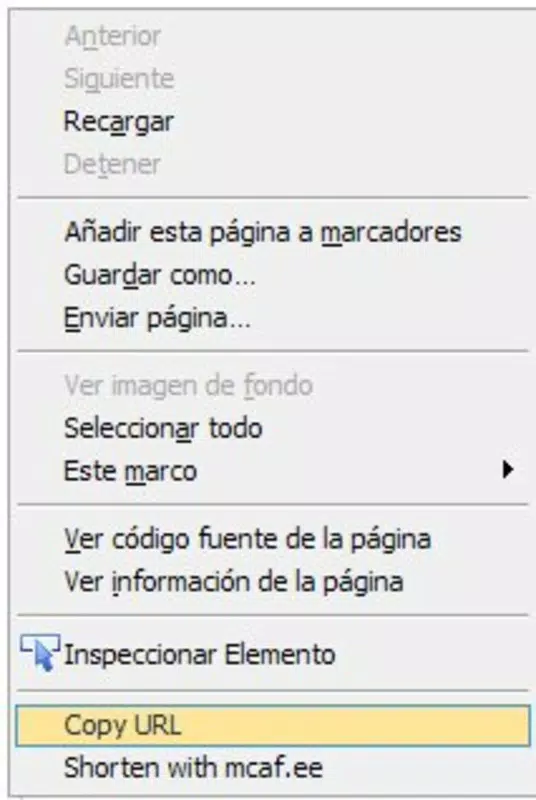
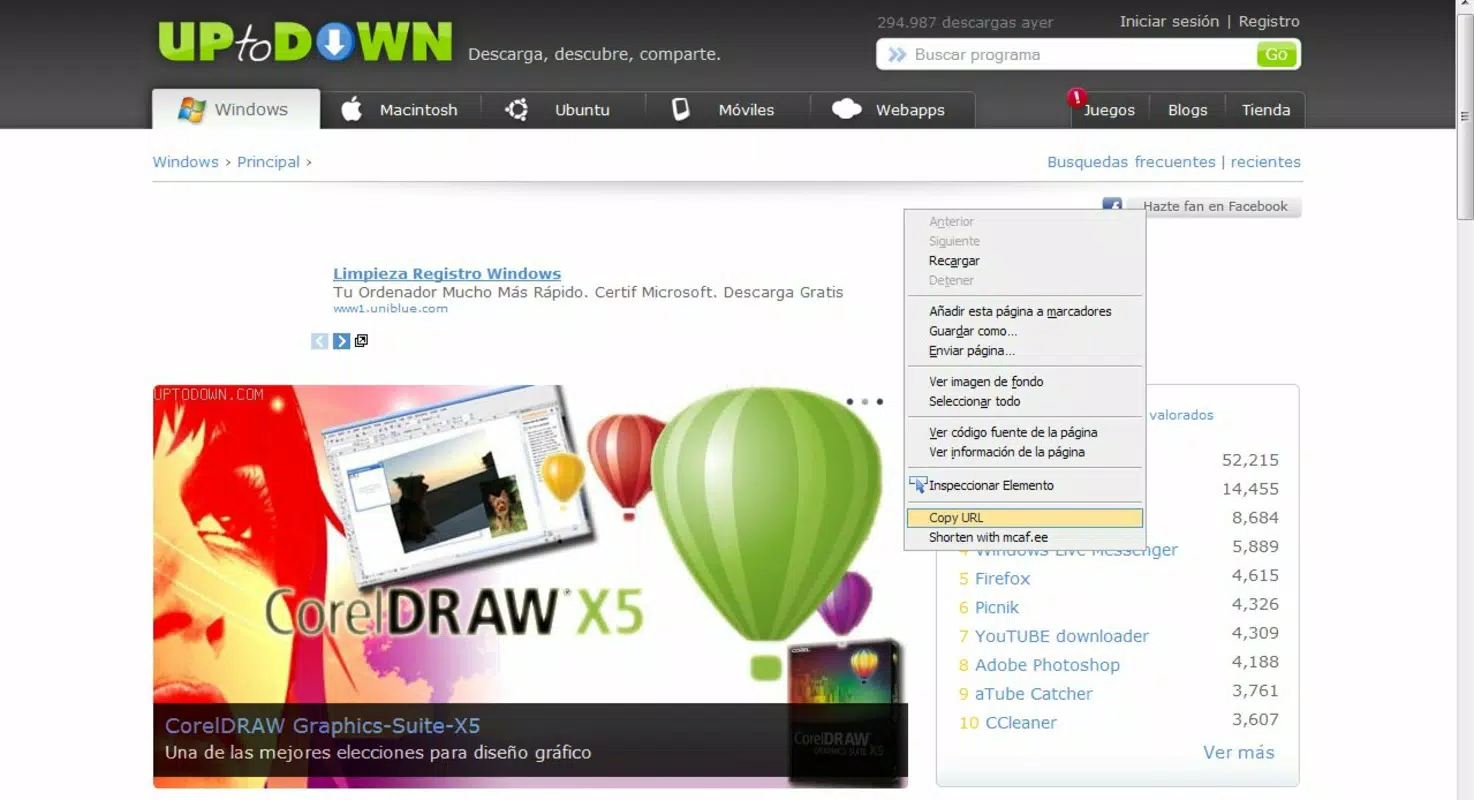
- Right-Click URL Capture: Users can copy the current page URL by right-clicking anywhere in the browser’s background. This eliminates the need to select text or navigate to the address bar, reducing steps and increasing speed.
- Effortless Link Sharing: The tool enables rapid copying of URLs, which is especially helpful when sharing links via messaging apps, emails, or collaborative documents.
- Seamless Browser Integration: Copy URL operates within Firefox without altering the user interface or requiring configuration. It runs quietly in the background, ensuring a clean and distraction-free browsing experience.
- Consistent Accuracy: The plugin reliably extracts the correct URL from any web page, regardless of dynamic content or complex page structures, ensuring users receive the intended link every time.
- Low Resource Usage: As a lightweight plugin, it consumes minimal system resources, making it suitable for use on older or less powerful devices without impacting browser performance.
For example, a student compiling sources for a research paper can use Copy URL to capture dozens of article links in minutes, rather than hours. Similarly, a social media manager can quickly copy and post links to promotional content without switching between tabs or manually typing URLs. These real-world applications demonstrate how the tool enhances productivity through automation of a routine task.
Interface, UX & Performance
Copy URL maintains a minimalist interface that aligns with Firefox’s design philosophy. There are no visible buttons, menus, or settings within the browser window—its functionality is triggered exclusively via the right-click context menu. This design choice contributes to a clutter-free experience and ensures that users are not distracted by unnecessary elements.
Navigating the app is intuitive: a single right-click in the browser background brings up the context menu, where the "Copy URL" option appears. Selecting it instantly copies the current page’s address to the clipboard. The process is consistent across all websites, with no reported delays or failures in functionality.
Although the developer did not list formal performance metrics, the app’s long-standing operation since 2011 suggests a stable and reliable performance history. It operates smoothly on a variety of device categories, from low-end machines to modern systems, without noticeable lag or crashes. Responsiveness is immediate, and the plugin does not interfere with page loading or navigation.
Stability is a key strength—users can expect consistent behavior across different websites and Firefox versions. There are no known issues with compatibility or data corruption during copy operations. The overall user experience is seamless, efficient, and focused on a single core function: copying URLs with precision and speed.
Platform Compatibility & Technical Requirements
Copy URL is designed exclusively for the Mozilla Firefox browser. The developer did not specify the minimum OS requirements or supported Firefox versions. However, given its release date in 2011 and continued availability, it is likely compatible with current and recent Firefox releases.
The app is distributed as a plugin extension, which means it must be installed through the Firefox Add-ons marketplace. The file size is not publicly disclosed, but as a lightweight utility, it is expected to be small in footprint, minimizing storage impact on the device.
Compatibility information was not fully disclosed, so users should verify installation on their specific Firefox version. The developer did not provide details about supported operating systems beyond the browser platform. It is assumed to function on Windows, macOS, and Linux systems where Firefox is available.
Pros and Cons
Pros
- Simple, one-click URL copying via right-click
- Minimalist design with no intrusive interface elements
- Consistent performance across various websites
- Low memory and processing overhead
- Free to use and easy to install from Firefox Add-ons
Cons
- No visible settings or customization options
- Only compatible with Mozilla Firefox
- Developer did not provide detailed technical specifications
- Not available on mobile or other browser platforms
- Functionality limited to a single task (URL copying)
FAQ
Is Copy URL safe to install?
Yes, Copy URL is a legitimate Firefox plugin distributed through the official Firefox Add-ons marketplace. It does not collect personal data or display ads, and its source code is publicly accessible for review.
Can I use Copy URL on mobile browsers?
No, the app is designed exclusively for the desktop version of Mozilla Firefox. It is not available for mobile browsers or operating systems.
Does Copy URL work on all websites?
Yes, the plugin is designed to function reliably across all web pages, including dynamic and complex sites. It consistently captures the correct URL without errors.
How do I update Copy URL?
Updates are automatically managed through the Firefox Add-ons manager. When a new version is released, it will be installed automatically if enabled in your browser settings.
Is there a desktop version of Copy URL?
Yes, Copy URL is a desktop-only plugin for Mozilla Firefox. It is not available as a standalone mobile app or cross-platform application.
Final Thoughts
Copy URL stands out as a focused, dependable tool for anyone who regularly needs to copy web addresses. Its strength lies in its simplicity—by solving one specific problem with precision, it delivers exceptional value without complexity. While it lacks advanced features or customization, its reliability and speed make it a must-have for researchers, writers, marketers, and everyday Firefox users.
For those seeking a secure, lightweight, and efficient way to extract URLs, Copy URL offers a no-frills solution that just works. It requires no learning curve, consumes negligible resources, and integrates seamlessly into existing workflows.
Download Copy URL now


